NSDL PAN Card Download (Protean) – Download e-PAN PDF Online
If you are searching for NSDL PAN card download, it usually means your PAN card was processed through the NSDL (now Protean eGov) system. In that case, the correct way to download your PAN card is through the official NSDL/Protean portal, where you can download your PAN card PDF (e-PAN) after verifying your details. PAN Card Download now
This page is a complete guide to help you:
- Download PAN card from NSDL using PAN number and DOB
- Download e-PAN PDF online after OTP verification
- Understand the PAN card PDF password
- Know when PAN download becomes available after applying
- Fix common NSDL PAN download errors like "Record not found"
If you want a full PAN Card download hub (NSDL + UTIITSL + Instant e-PAN), visit PAN Card Download
NSDL PAN Download (Protean) – Is it the Same?
Yes. NSDL PAN services are now handled under Protean eGov Technologies Ltd. (formerly NSDL e-Governance). That's why many users search for NSDL PAN download but see "Protean" on the official website.
So if you see:
- NSDL PAN card download
- Protean PAN download
- NSDL e PAN card download
…it refers to the same government-authorized PAN service provider.
What is NSDL PAN Card Download?
NSDL PAN card download means downloading your PAN in digital form as a PAN card PDF (also called an e-PAN). This e-PAN is generally:
- A secure PDF file
- Password-protected
- Digitally signed in most cases
- Accepted for KYC, banking, and tax purposes
This is useful if you:
- Applied for a PAN card through NSDL
- Need a digital PAN card urgently
- Lost your physical PAN card
- Want to download PAN card online for verification
Who Should Use NSDL PAN Card Download?
You should use NSDL/Protean download method if:
- You applied for PAN card through NSDL/Protean portal
- Your acknowledgement number was generated through NSDL
- Your PAN status is available in NSDL tracking
- Your PAN record is stored in NSDL database
If your PAN was processed through UTIITSL, NSDL may show "Record not found".
➡️ If your PAN is UTI-based, use UTI PAN Card DownloadWhat You Need Before Downloading PAN Card from NSDL
Before starting download pan card NSDL, keep these details ready:
Required (most common)
- PAN number
- Date of Birth (DOB) as per PAN record
- Registered mobile number (for OTP verification)
If PAN is newly applied
- Acknowledgement number (useful if PAN not received yet)
Important note
If your mobile number is not linked or inactive, OTP verification may fail. In that case, you may need to update details through the correct PAN correction service.
➡️ For correction help PAN Card CorrectionHow to Download PAN Card from NSDL (Step-by-Step)
If you want to know how to download PAN card online through NSDL, follow these steps.
1Step 1: Open NSDL/Protean PAN download page
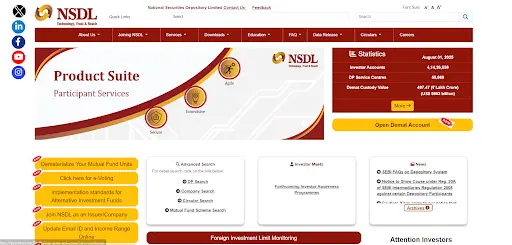
Visit the official NSDL/Protean e-PAN download portal.
2Step 2: Enter PAN number or acknowledgement number
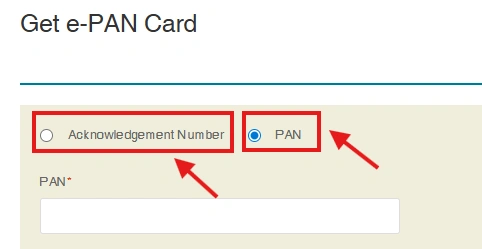
Select the option you have available.
3Step 3: Enter Date of Birth (DOB)
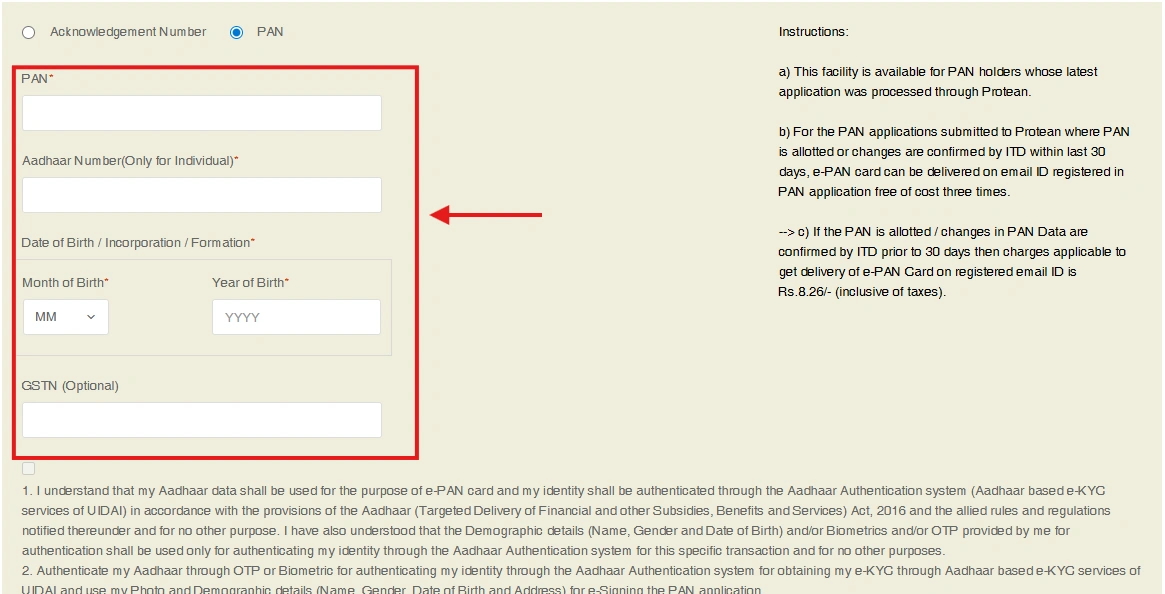
DOB must match exactly as per PAN record.
4Step 4: Verify OTP
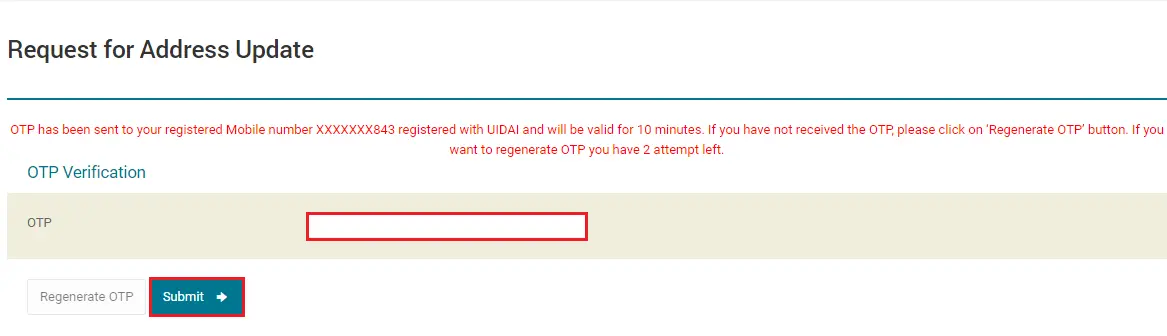
An OTP will be sent to your registered mobile number.
5Step 5: Download PAN card PDF
After successful verification, you can download your e-PAN PDF.
This is the correct NSDL method for:
- nsdl pan card download
- pan card download nsdl
- download pan card nsdl
PAN Card Download by PAN Number (NSDL Method)
A lot of users specifically want PAN card download by PAN number. NSDL supports this method for eligible PAN records.
Steps (PAN number method)
- Enter your PAN number
- Enter DOB
- Verify OTP
- Download PAN card PDF
If your PAN is active and your mobile number is linked, this method works smoothly.
NSDL PAN Card Download Using Acknowledgement Number
If you applied recently and do not have your PAN number yet, you can try downloading using the acknowledgement number.
When this works
This method works only when:
- PAN has been allotted, and
- the NSDL database has been updated
If your PAN is still under processing, the portal may show "Record not found".
NSDL e PAN Card Download (PAN Card PDF)
The file you download from NSDL is called an e-PAN.
What you get
- PAN card PDF (digital format)
- Digitally signed document (in most cases)
- Password-protected secure file
Where it is used
You can use e PAN card download for:
- Bank KYC and verification
- Income tax filing and ITR work
- Job/employer verification
- Government forms and online applications
- Digital proof in many official processes
PAN PDF Validity – Is NSDL e-PAN PDF Valid?
Yes. The PAN card PDF downloaded from NSDL is a valid digital document.
In most cases:
- It is digitally signed
- It is accepted for KYC, banking, and tax-related work
- It works for online verification and submissions
e-PAN vs Physical PAN Card (Difference)
| Feature | e-PAN PDF (NSDL Download) | Physical PAN Card |
|---|---|---|
| Format | Digital PDF | Printed card |
| Availability | Instant download | Delivered by post |
| Validity | Valid for most uses | Valid everywhere |
| Best for | Online use | Offline/physical proof |
For most online purposes, the NSDL PAN card PDF is enough. If you specifically need a physical PAN card, you may need to request a reprint.
➡️ PAN Card Reprint GuidePAN Card PDF Password (NSDL)
After your NSDL PAN card download, your PDF may ask for a password. This is normal.
PAN PDF password (most common)
Your password is usually:
DOB in DDMMYYYY format
Example:
DOB: 14/07/1999
Password: 14071999
If password doesn't work
- Check DOB entered during application
- Confirm DOB format
- Download the PDF again
When NSDL PAN Download Becomes Available After Applying
This is one of the most important questions.
If you applied for a new PAN card, your e-PAN may not be downloadable immediately.
NSDL download becomes available when:
- PAN is allotted successfully
- PAN is updated in NSDL/Protean database
Typical download time
- Often within a few hours
- Sometimes up to 24–48 hours
If you see "Record not found", it usually means your PAN is not yet updated.
Is NSDL PAN Card Download Free?
Many users search for "free download PAN card NSDL".
Here is the correct clarification:
- Downloading your already allotted PAN card PDF is often free
- Applying for duplicate/reprint PAN is usually a paid service
- Correction/update may also involve charges depending on request type
To stay safe, always use official portals and avoid websites that demand payment only for downloading your PAN PDF.
Can I Download PAN Card NSDL Using Aadhaar OTP?
Aadhaar OTP is commonly used for instant e-PAN through the Income Tax portal.
NSDL download generally works best using:
- PAN number + DOB + OTP
If your goal is instant PAN via Aadhaar OTP, use:
➡️ Instant E PANNSDL PAN Download Errors (Common Issues + Fixes)
NSDL PAN download portals may show errors due to incorrect details, wrong portal selection, or server issues. Below are the most common problems and their correct fixes.
1) "Record Not Found" / "PAN Not Available"
Why it happens
- PAN not allotted yet
- PAN not updated in NSDL database
- PAN processed via UTIITSL
- Wrong details entered
Fix
- Recheck PAN number and DOB
- Wait a few hours if newly allotted
- If PAN is UTI-based, use UTI PAN Card Download
2) "Details Not Matched"
Why it happens
- DOB mismatch
- PAN typed incorrectly
Fix
- Enter DOB exactly as per PAN record
- Use correct PAN number (capital letters)
- Avoid extra spaces
3) OTP Not Received
Why it happens
- SMS delay
- Mobile number not linked
- Network issues
Fix
- Wait 1–2 minutes
- Use Resend OTP
- Try again later
4) PAN PDF Not Opening
Why it happens
- Wrong password
- Incomplete download
Fix
- Use DOB in DDMMYYYY format
- Download again
- Try opening with updated PDF reader
5) Server Busy / Portal Down
Fix
- Try again after 10–20 minutes
- Prefer early morning or late night
6) Link Expired / Session Timeout
Fix
- Refresh page and start again
- Generate a new OTP and retry
NSDL PAN Download vs UTI PAN Download (Difference)
Many people attempt NSDL download even when their PAN is in UTI database.
NSDL/Protean
- Used if PAN was processed through NSDL
- Best for NSDL acknowledgement numbers
- Works for NSDL e-PAN PDF download
Related PAN Services
If you are downloading PAN card through NSDL, you may also need:
FAQs – NSDL PAN Card Download
Disclaimer (Official Guidance)
This website is an informational guide. We are not affiliated with NSDL, UTIITSL, or the Income Tax Department. For PAN services, always use official government-authorized portals.