Apply PAN Card via NSDL Online (Protean) – Step-by-Step Guide
Applying for a PAN card online through NSDL (Protean eGov Technologies) is one of the most trusted and widely used methods in India. If you are searching for apply PAN card NSDL, you are likely trying to submit a new PAN application, get an e-PAN, or understand the full NSDL process including documents, fees, tracking, and timelines.
This guide explains everything in one place — from choosing the correct form (49A/49AA) to submitting documents, making payment, and checking your application status.
Important: This is an informational guide. PAN is issued by the Income Tax Department of India. NSDL/Protean is an authorised service provider.
Quick Steps: NSDL PAN Card Apply Online (Fast Summary)
If you want the shortest method, follow this flow:
- Open the official NSDL/Protean PAN application portal
- Select your application type (New PAN / Correction / Reprint)
- Fill basic details (name, DOB, mobile, email)
- Complete Aadhaar eKYC or upload documents
- Pay fees and submit the form
- Save your acknowledgement number
- Track status and download e-PAN after allotment
➡️ If your PAN is already allotted and you only want the PDF, visit: PAN Card Download
What is NSDL (Protean) PAN Card Apply?
NSDL (now Protean eGov Technologies) is one of the authorised agencies that processes PAN card applications on behalf of the Income Tax Department. When you apply through NSDL, your details are verified, and after successful processing, your PAN is allotted by the department.
Applying through NSDL is useful because:
- The online process is structured and widely used
- You can apply using Aadhaar-based eKYC
- You get an acknowledgement number for tracking
- You can download e-PAN after allotment
NSDL vs UTIITSL: Which Portal Should You Use?
This is one of the biggest confusions for users.
Both NSDL (Protean) and UTIITSL are authorised PAN service providers. The PAN issued is the same, because PAN is issued by the Income Tax Department.
Choose NSDL if:
- You want a smooth online experience
- You are comfortable with Aadhaar eKYC
- You want fast acknowledgement and tracking
Choose UTIITSL if:
- You prefer the UTI interface
- You already used UTI earlier for PAN services
➡️ For the UTI method, visit: Apply PAN Card via UTIITSL
Who Can Apply for a PAN Card via NSDL?
You can apply through NSDL if you fall into any of these categories:
Individuals
- Salaried individuals
- Students
- Self-employed professionals
- Anyone who needs PAN for KYC, bank account, or tax work
Minors (Under 18)
Yes, a minor can also apply for a PAN card. It is useful for:
- Opening bank accounts
- Investments in the minor's name
- Scholarship and education-related KYC
(Parent/guardian documents are required — explained later.)
Businesses & Entities
NSDL also supports PAN application for:
- Partnership firms
- Companies and LLPs
- Trusts and societies
- HUF (Hindu Undivided Family)
Which Form is Used? (Form 49A vs 49AA)
This section is important because many people fill the wrong form.
Form 49A
Use this if you are:
- An Indian citizen
- An entity registered in India
Form 49AA
Use this if you are:
- A foreign citizen
- An entity registered outside India
- Applying for PAN for international tax/financial reasons
What You Need Before Applying via NSDL (Checklist)
Before you start your NSDL PAN card apply online process, keep these details ready:
- Mobile number (OTP verification)
- Email ID (acknowledgement + PDF)
- Aadhaar number (recommended for eKYC)
- Identity proof (POI)
- Address proof (POA)
- Date of birth proof (DOB)
- Photograph + signature (if required)
- Bank details (optional, but useful)
If you want the fastest experience, Aadhaar-based eKYC is the best option.
Step-by-Step: How to Apply PAN Card via NSDL Online
This is the main section users come for.
1Step 1: Open NSDL/Protean PAN Portal
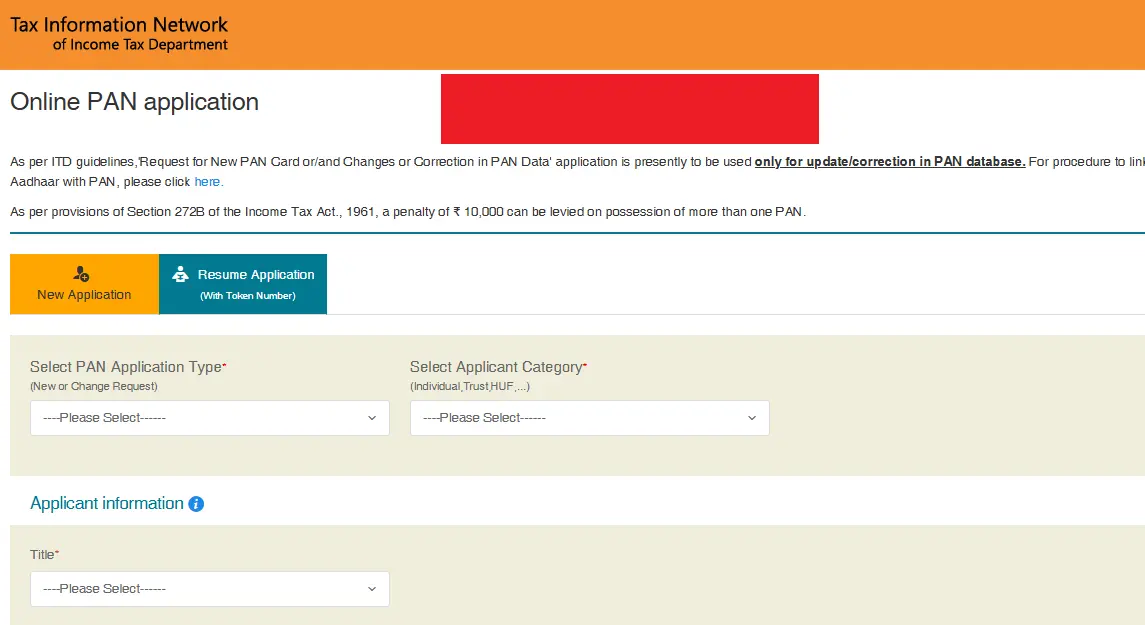
Go to the official NSDL PAN apply page and choose:
- New PAN (Form 49A / 49AA)
- Correction / Update
- Reprint / Duplicate
2Step 2: Select Application Type
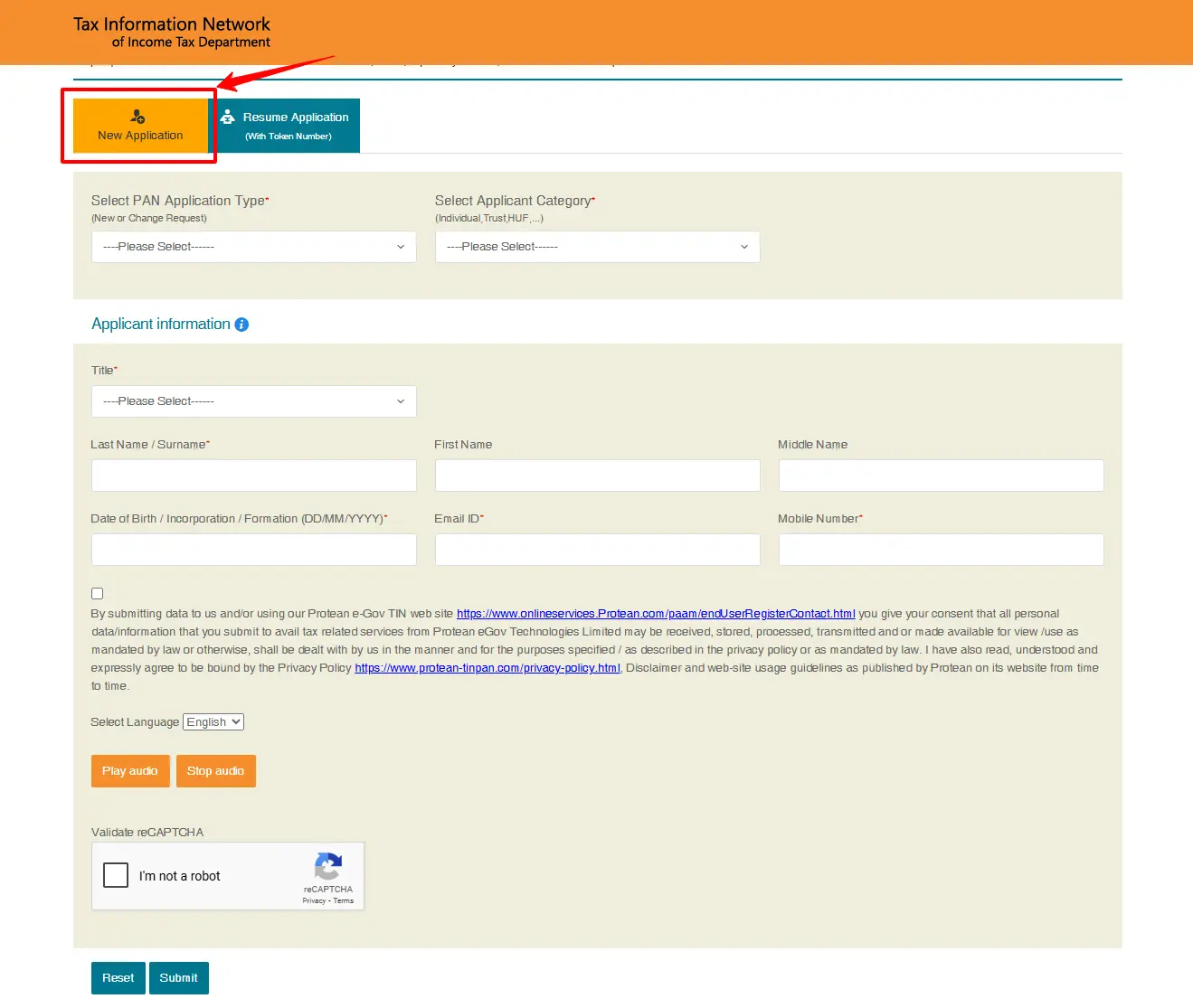
Choose the correct option based on your need:
- New PAN card apply (first-time PAN)
- PAN correction (name, DOB, address update)
- Reprint PAN card (lost/damaged/not received)
➡️ For reprint, see: NSDL PAN Card Reprint
3Step 3: Fill Basic Details
Enter details carefully:
- Full name (as per Aadhaar)
- Date of birth
- Mobile number
- Email address
- Residential address
- Father's name (if required)
Tip: Most rejections happen due to spelling mismatches.
4Step 4: Choose Submission Method (eKYC or Documents)
NSDL usually offers two ways:
Option A: Aadhaar eKYC (Recommended)
- OTP is sent to Aadhaar-linked mobile
- Most details auto-verified
- Faster processing
Option B: Upload Documents
If Aadhaar is not available or OTP fails:
- Upload POI, POA, DOB proofs
- Upload photo/signature (as per size rules)
5Step 5: Upload Photo and Signature (If Required)
If you are uploading manually, ensure:
- Photo is clear and recent
- Signature is readable
- File format and size match portal requirements
6Step 6: Make Payment
After form submission, you will pay fees online using:
- UPI
- Debit card / credit card
- Net banking
Payment confirmation is important because it triggers acknowledgement generation.
7Step 7: Download Acknowledgement (Most Important)
After payment, NSDL generates an acknowledgement number.
You must save it because it is used for:
- Tracking PAN application status
- Support queries
- Downloading confirmation PDF
NSDL PAN Application Fees (Quick Table)
Fees may vary based on delivery type and address.
| Type | What you get | Fees |
|---|---|---|
| e-PAN only | Digital PAN PDF | Usually lower |
| Physical PAN card | Printed card delivered | Higher |
| Foreign address delivery | International delivery | Highest |
Documents Required for PAN Card Apply via NSDL
This is one of the most searched topics.
For Individuals (Indian Citizens)
| Proof Type | Examples |
|---|---|
| Identity Proof (POI) | Aadhaar, Passport, Voter ID, Driving Licence |
| Address Proof (POA) | Aadhaar, Passport, Bank statement, Utility bill |
| DOB Proof | Aadhaar, Birth certificate, Passport, 10th marksheet |
For Minors (Under 18)
A minor PAN application requires:
- Minor's DOB proof
- Parent/guardian identity proof
- Parent/guardian address proof
Signature can be of the parent/guardian.
For Business / Entities
Entities may require:
- Registration certificate
- Partnership deed (for firms)
- Company incorporation documents
- Authorised signatory proof
How to Track NSDL PAN Card Application Status
Once you submit your form, tracking becomes the next intent.
You can track your application using:
- Acknowledgement number
- Date of birth
- Captcha
Your status may show stages like:
- Submitted
- Under verification
- Approved
- PAN allotted
- Dispatched (if physical card chosen)
How Many Days to Get PAN Card After Applying Online?
This is a high-intent question and should be answered clearly.
Typical timeline:
- Instant e-PAN (Aadhaar OTP eligible): sometimes same day
- Normal NSDL PAN apply online: 2 to 7 working days
- Physical PAN card delivery: 7 to 15 days (depends on courier)
If you applied recently and see "record not found", wait 24–48 hours and try again.
What Happens After PAN is Allotted? (Next Steps)
Once your PAN is allotted, you should do these immediately:
- Download e-PAN PDF
- Download from Home Hub
- Link PAN with Aadhaar (If required)
- Verify e-PAN XML (Optional but useful)
1) Download e-PAN PDF ➡️ Go to: NSDL PAN Card Download
2) Download from Home Hub ➡️ Visit: PAN Card Download
3) Link PAN with Aadhaar (If required) ➡️ Guide: PAN Aadhaar Linking
4) Verify e-PAN XML (Optional but useful) ➡️ Guide: e-PAN XML Verification
PAN Card 2.0 (NSDL) – What You Should Know
Many people search for PAN Card 2.0 and assume it is a different PAN.
In reality:
- PAN number remains the same
- It is an upgraded system for PAN services
- Your application still goes through authorised portals like NSDL/UTI
So you don't need a separate PAN if you already have one.
Common Problems While Applying PAN Card via NSDL
1) OTP Not Received
- Wait 1–2 minutes
- Use resend OTP
- Check network and SMS inbox
2) Aadhaar Authentication Failed
- Ensure Aadhaar mobile is active
- Verify Aadhaar details match PAN application details
3) Payment Successful but No Acknowledgement
- Wait 10 minutes
- Check email inbox/spam
- Retry status page using mobile/email
4) Session Expired / Page Reload
- Use a stable network
- Avoid back button
- Complete the form in one go
5) Application Rejected
Common reasons:
- Mismatch in name/DOB
- Poor quality photo/signature
- Wrong document type uploaded
If rejected, you may need to apply again or use correction service later.
FAQ
Disclaimer (Important)
This website provides informational guidance for PAN services. We are not affiliated with NSDL/Protean, UTIITSL, or the Income Tax Department. Always use official portals for PAN card apply, status, correction, and download.